The creative industry is evolving rapidly with the rise of Artificial Intelligence, immersive digital experiences, and growing demand for visually engaging content. Companies today seek professionals who can combine creativity, technology, and AI to design user-friendly websites, create compelling graphics, produce engaging videos, and build digital experiences.
If you’re starting your career in 2026, learning UI/UX Design, Graphic Design, Motion Graphics, AI Filmmaking, and Website Development through a structured roadmap is one of the smartest ways to become a future-ready digital professional.
This guide outlines a step-by-step learning roadmap—from beginner to professional—covering essential skills, industry-standard software, portfolio development, practical training, career opportunities, salary expectations, and the value of earning a Government Certificate.
Why Learn Multiple Digital Creative Skills?
The digital economy is creating opportunities across industries, including IT, e-commerce, media, education, healthcare, advertising, and startups.
Modern businesses need professionals who can:
- Design intuitive user interfaces
- Build responsive websites
- Create engaging visual content
- Produce motion graphics and animations
- Edit professional videos
- Leverage AI-powered creative tools
- Collaborate across design, development, and marketing teams
Learning multiple complementary skills increases your employability, adaptability, and career growth.
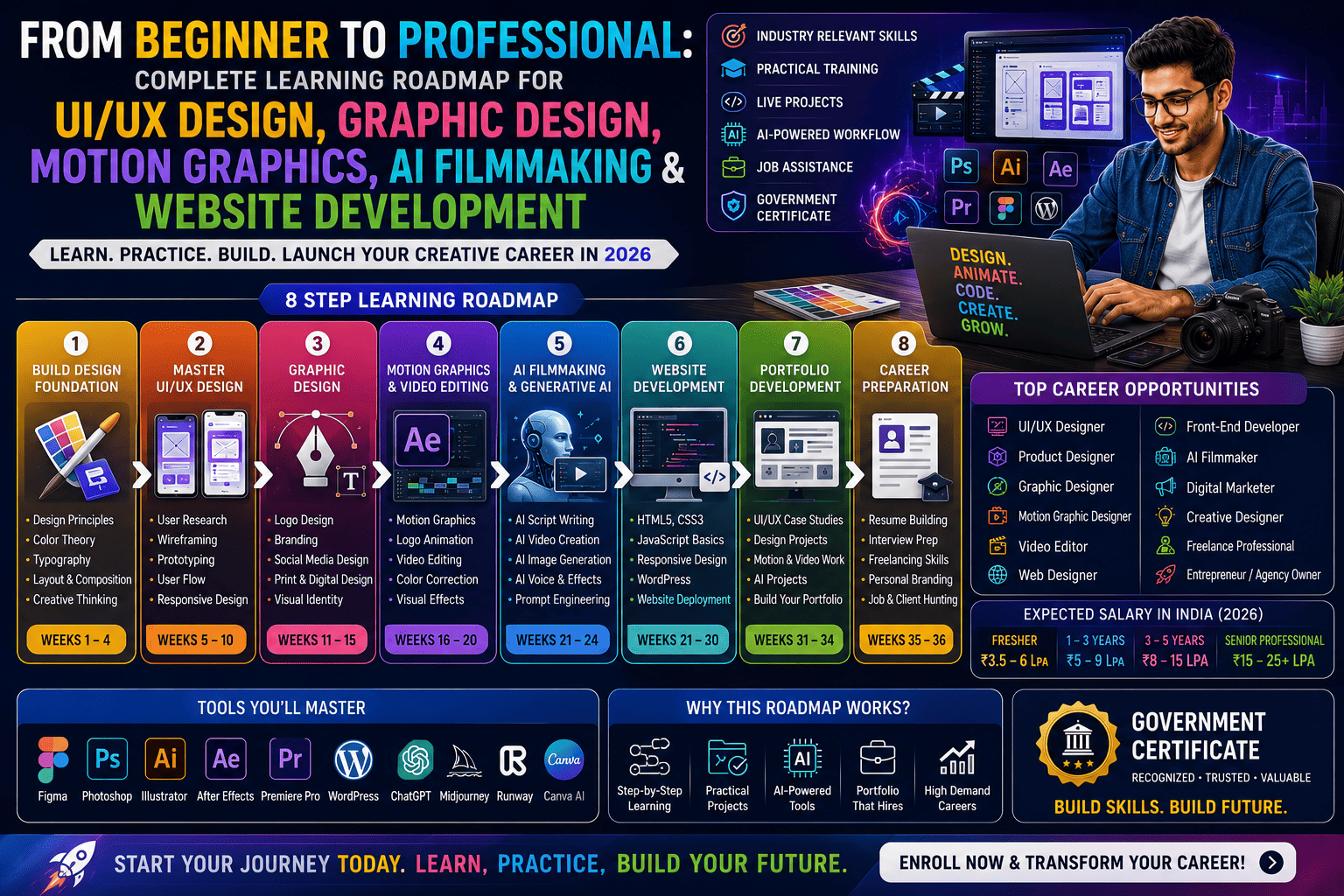
Step-by-Step Learning Roadmap
Stage 1: Build Your Design Foundation (Weeks 1–4)
Every successful designer begins with strong fundamentals.
Learn:
- Design Principles
- Color Theory
- Typography
- Layout & Composition
- Visual Hierarchy
- Design Thinking
- Creative Problem Solving
Practice:
- Poster Designs
- Social Media Creatives
- Logo Concepts
- Brand Mood Boards
Software:
- Adobe Photoshop
- Adobe Illustrator
- Canva
- Figma (Basics)
Goal: Understand visual communication and basic design workflows.
Stage 2: Master UI/UX Design (Weeks 5–10)
Learn to create digital experiences that are both attractive and user-friendly.
Topics Covered
- User Research
- User Personas
- Information Architecture
- Wireframing
- User Flows
- Prototyping
- Responsive Design
- Mobile App Design
- Website UI Design
- Usability Testing
Software
- Figma
- Adobe XD (where applicable)
Practical Projects
- Mobile App UI
- Food Delivery App
- Banking App
- E-commerce Website
- Travel Booking Interface
Goal: Build user-centered digital products.
Stage 3: Learn Graphic Design (Weeks 11–15)
Graphic Design strengthens branding and visual communication skills.
Learn
- Logo Design
- Brand Identity
- Print Design
- Packaging Design
- Advertising Creatives
- Social Media Graphics
- Corporate Branding
Software
- Adobe Photoshop
- Adobe Illustrator
- Adobe InDesign
Projects
- Business Branding
- Social Media Campaign
- Product Packaging
- Marketing Brochures
Goal: Create professional visual identities for businesses.
Stage 4: Motion Graphics & Video Editing (Weeks 16–20)
Motion content dominates digital platforms.
Learn
- Motion Graphics
- Logo Animation
- Kinetic Typography
- Explainer Videos
- Video Editing
- Color Correction
- Audio Editing
- Visual Effects Basics
Software
- Adobe After Effects
- Adobe Premiere Pro
Projects
- YouTube Intro
- Instagram Reels
- Promotional Videos
- Brand Animations
Goal: Produce engaging multimedia content.
Stage 5: AI Filmmaking & Generative AI (Weeks 21–24)
Artificial Intelligence is transforming creative workflows.
Learn
- AI Script Writing
- AI Storyboarding
- AI Video Creation
- AI Voice Generation
- AI Image Creation
- AI Editing Assistance
- Prompt Engineering
- Creative Automation
Popular AI Tools
- ChatGPT
- Adobe Firefly
- Runway
- Midjourney
- DALL·E
- Canva AI
- Microsoft Copilot
Projects
- AI Commercial Video
- AI Short Film
- AI Marketing Campaign
- AI Storyboard
Goal: Learn to use AI as a creative assistant while maintaining originality and human oversight.
Stage 6: Website Development (Weeks 25–30)
Every digital product needs a functional online presence.
Learn
- HTML5
- CSS3
- JavaScript Basics
- Responsive Web Design
- WordPress Development
- Website Hosting
- Website Deployment
Projects
- Portfolio Website
- Business Website
- Landing Pages
- E-commerce Homepage
Goal: Build responsive, user-friendly websites.
Stage 7: Portfolio Development (Weeks 31–34)
Your portfolio is often the first thing employers and clients evaluate.
Include
- UI/UX Case Studies
- Graphic Design Projects
- Motion Graphics
- Video Editing Samples
- AI Creative Projects
- Website Designs
- Branding Projects
Tips
- Showcase your design process.
- Explain your decisions and outcomes.
- Include measurable results where possible.
- Keep the portfolio clean, responsive, and easy to navigate.
Stage 8: Career Preparation (Weeks 35–36)
Prepare for job applications and freelance opportunities.
Focus Areas
- Resume Building
- LinkedIn Optimization
- Interview Preparation
- Mock Interviews
- Freelancing Platforms
- Client Communication
- Personal Branding
- Networking
Essential Software You’ll Learn
| Category | Software |
|---|---|
| UI/UX Design | Figma, Adobe XD |
| Graphic Design | Adobe Photoshop, Illustrator, InDesign |
| Motion Graphics | Adobe After Effects |
| Video Editing | Adobe Premiere Pro |
| Website Development | HTML, CSS, JavaScript, WordPress |
| AI Tools | ChatGPT, Adobe Firefly, Runway, Midjourney, Canva AI, DALL·E |
Skills You’ll Master
By following this roadmap, you’ll develop expertise in:
- Design Thinking
- User Research
- Wireframing
- Visual Communication
- Branding
- Responsive Design
- Motion Graphics
- Video Production
- AI Prompting
- Website Development
- Creative Storytelling
- Collaboration
- Portfolio Presentation
Benefits of a Government Certificate
A Government-recognized certificate can help you:
- Validate your skills
- Strengthen your resume
- Improve interview credibility
- Support internship applications
- Build trust with freelance clients
While valuable, employers typically assess practical abilities and portfolio quality alongside certifications.
Career Opportunities
After completing this roadmap, you can pursue roles such as:
- UI Designer
- UX Designer
- Product Designer
- Graphic Designer
- Brand Designer
- Motion Graphic Designer
- Multimedia Designer
- Video Editor
- AI Filmmaker
- Web Designer
- Front-End Developer
- WordPress Developer
- Creative Designer
- Digital Content Creator
- Freelance Creative Professional
Expected Salary in India (2026)
Salary varies depending on skills, experience, employer, location, and portfolio.
| Experience | Expected Annual Salary |
|---|---|
| Fresher | ₹3.5–6 LPA |
| 1–3 Years | ₹5–9 LPA |
| 3–5 Years | ₹8–15 LPA |
| Senior Professionals | ₹15–25+ LPA |
Freelancers and entrepreneurs may earn more depending on their client base and project scope.
Why Practical Training Is Essential
To become job-ready, choose a course that offers:
- Live Industry Projects
- Real Client Assignments
- Portfolio Development
- Internship Opportunities
- AI Tool Workshops
- Resume Building
- Mock Interviews
- Placement Assistance
- Career Mentoring
Hands-on experience helps you confidently apply your knowledge to real-world challenges.
Future Trends in Digital Creative Careers
The future of creative work is being shaped by:
- AI-Assisted Design
- AI Video Production
- Motion Branding
- Personalized User Experiences
- Interactive Multimedia
- No-Code Website Development
- Marketing Automation
- AR/VR Experiences
- Intelligent Design Systems
- Human-AI Collaboration
Professionals who embrace lifelong learning and emerging technologies will remain highly competitive.
Frequently Asked Questions (FAQs)
1. Can beginners learn UI/UX Design, Graphic Design, Motion Graphics, AI Filmmaking, and Website Development together?
Yes. A structured learning roadmap introduces each skill progressively, making it suitable for beginners with no prior experience.
2. How long does it take to become job-ready?
A comprehensive, practical program typically takes 6–12 months, depending on the course structure, learning pace, and time dedicated to projects and portfolio development.
3. Which software should I learn first?
Start with Figma, Adobe Photoshop, and Adobe Illustrator, then progress to After Effects, Premiere Pro, and web technologies like HTML, CSS, and WordPress.
4. Is AI Filmmaking replacing traditional video production?
No. AI enhances workflows by speeding up scripting, editing, and content generation, while creative direction, storytelling, and production expertise remain essential.
5. Can I freelance after completing this roadmap?
Yes. Skills in UI/UX Design, Graphic Design, Motion Graphics, Website Development, and AI-assisted content creation are highly sought after by freelance clients worldwide.
6. What should my portfolio include?
Include UI/UX case studies, branding projects, graphic designs, motion graphics, videos, AI-assisted creative work, and responsive websites that demonstrate your problem-solving process.
7. Is a Government Certificate enough to get a job?
A Government Certificate enhances your credibility, but employers also value practical skills, a strong portfolio, communication abilities, and real project experience.
8. Which industries hire professionals with these skills?
Technology companies, startups, advertising agencies, media houses, healthcare organizations, e-commerce businesses, educational platforms, financial institutions, and creative studios all hire professionals with multidisciplinary digital skills.
Conclusion
The creative industry of 2026 rewards professionals who can combine UI/UX Design, Graphic Design, Motion Graphics, AI Filmmaking, and Website Development into a unified skill set. Following a structured learning roadmap helps you build strong fundamentals, master industry-standard tools, develop an impressive portfolio, and gain practical experience through real-world projects.
Whether your goal is to secure a high-paying job, work as a freelancer, or start your own creative agency, investing in these future-ready digital skills—supported by practical training and a Government-recognized certificate—positions you for long-term success in the evolving digital economy.